
Is Your Business Ready for Google and AI Search? What an SEO Audit Reveals

Every website needs to be structured, coded and optimised properly to appear in search results — but in 2026, that means more than just Google page 1.
Your customers are now searching in AI tools like ChatGPT, Gemini, and Perplexity. These platforms don't show a list of websites — they generate answers. If your business isn't structured and positioned to be included in those answers, you're invisible to a growing segment of your market.
For example: if you have a concreting business, you'd want to appear in Google's AI Overview when someone asks "best local concreter near me", show up in the local 3-Pack below the map, and rank on page 1 organically. If you're missing from all three, you're losing enquiries to competitors who aren't necessarily better — they're just better optimised.
If you've been paying an SEO agency to build your visibility and aren't sure if it's working, an SEO audit will give you the honest picture.
Is Your Business Listed on Google Business Profile?
Before diving into the audit process, there's one fundamental question — is your business listed on Google Business Profile (GBP)?
This is the single most important factor for local search visibility. Your GBP listing is what appears on Google Maps and in the local 3-Pack — the three businesses shown prominently below the map when someone searches for a service in their area. It also feeds directly into Google's AI Overviews and other AI-generated local answers.
Without a verified and fully completed GBP listing, your business won't appear in local search results no matter how well your website is optimised. It's the foundation everything else is built on.
SEO Audit Process
Running an SEO Audit is a critical step in determining if your website has been SEO'd properly. But there are more things that need to be reviewed than the issues which a typical SEO Audit uncovers.
Here’s the five-step SEO analysis process we follow to see what has been done, or not done.
Step 1 – Run an onsite SEO audit
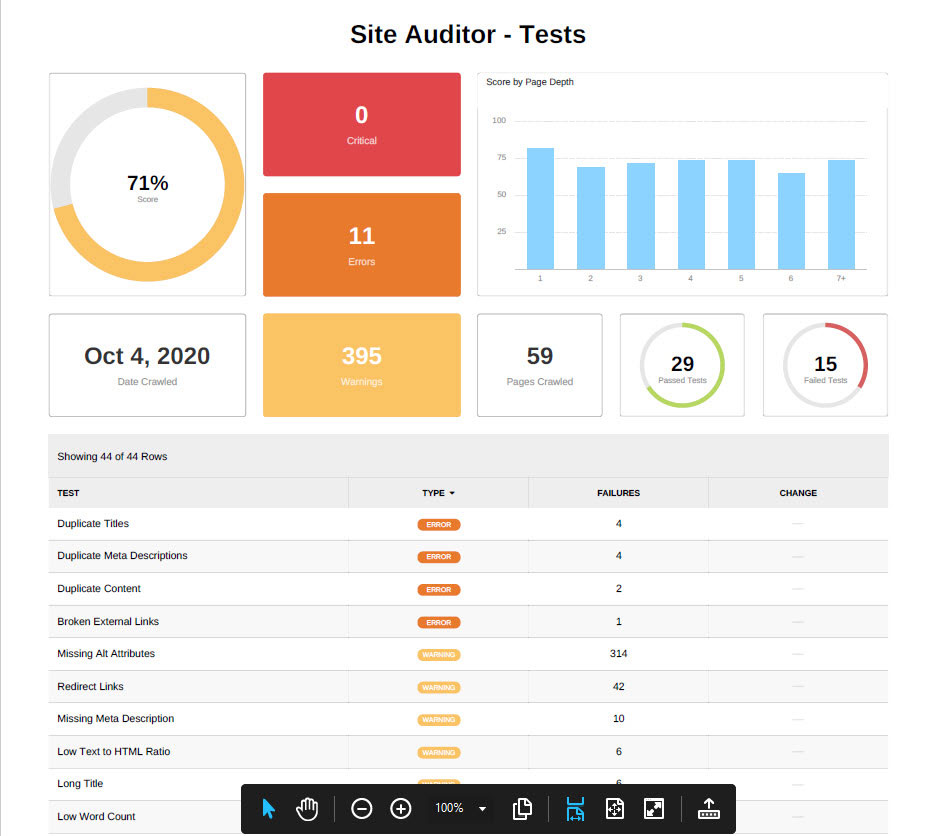
Figure 1 – SEO Audit
What is an SEO audit?
We use a suite of professional tools to conduct an SEO audit and it can take anywhere from a few minutes to several hours, depending on the size of the website.
The audit report highlights any problems with your website that are making it harder for Google to find and rank you. Issues are flagged in order of seriousness, so you can see at a glance what needs urgent attention, what's worth fixing soon, and what's minor.
A note on AI visibility: A standard SEO audit tool won't tell you whether your business is appearing in AI-generated answers. That requires a separate check — we manually review how your business is referenced (or not) in tools like ChatGPT, Gemini, and Perplexity for your key search terms. This is now a standard part of our audit process.
Figure 1 above shows a snapshot of one of these audits we ran for a new client.
In this example, there are no critical issues, but a few things still need attention. Two of the most common problems we find are:
Duplicate content — when the same information appears in more than one place on a site, Google struggles to work out which page is most relevant, so neither ranks as well as it should.
Missing image descriptions — every image on your site should have a short description attached to it (known as "alt text") so Google understands what the image is about and can include it in relevant searches.
An SEO audit gives you a clear, prioritised list of exactly what needs fixing — and why it matters.
Step 2 – Review onsite SEO
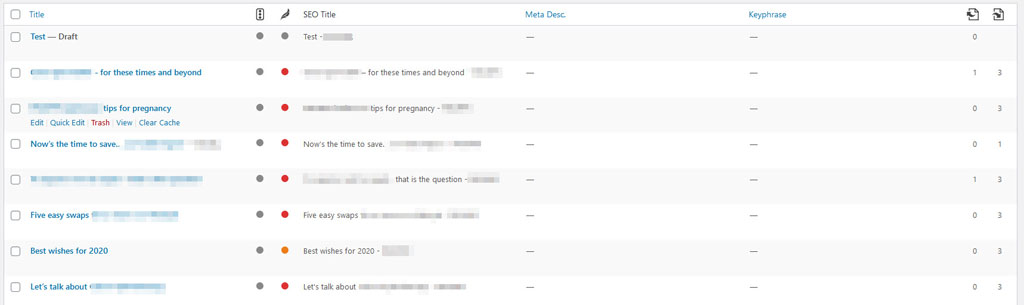
Figure 2 –blogposts and SEO information
The next step is to access the backend of the website and review the pages, posts and products to see:
- if they have been optimised, and
- how well they have been optimised, or if there’s still more work to be done.
Figure 2 below shows a list of blogposts in a wordpress website. This particular client had paid for someone to do SEO, but this shows us that it has not been done.
How do we know? The first column of grey dots below the traffic light symbol is the first giveaway. If these posts had been optimised, the grey dots would be green, orange or red – a rating score that indicates how well the post has been optimised to meet Google’s guidelines.
- Red means some work has been done, but nowhere near enough
- Orange means it’s pretty good, and there’s just a few things left to do to improve it
- Green means the post has been properly optimised for search engines
You can see under the SEO title heading that SEO titles have been added. We’ve obscured the actual title information to protect the client’s privacy, but what we can tell you is that the SEO title is a duplication of the post title. It is not recommended to always duplicate these. The SEO title shows up in search results and should be structured to grab attention and entice you to read the description underneath. It needs to describe what the post is about and contain the keyword.
The biggest clue of all is that this site has not had onsite SEO done to is the lack of keywords in the Keyphrase column, and lack of information in the Meta Description column. You cannot optimise a post or page or product if you don’t assign a keyword (keyphrase)!
If keywords and meta descriptions have been entered, then we review them to ensure
- the keywords are relevant to the page
- the keywords have acceptable monthly search volumes and a low keyword difficulty score
- there’s a unique keyword phrase for every page / post
- the seo title and meta descriptions do not exceed the character limits
- they are well written and entice viewers to click and visit the site
Step 3 – Review site load speed
Google’s SEO guidelines are all formulated around providing users with a great experience, and one of the top priorities is load speed – particularly on mobile phones.
We run the site through an advanced speed testing tool to see how it performs on desktops and mobile phones. Figures 3 and 4 shows two speed tests recently conducted on a client’s site.


Both of these speed tests show that this website is very slow to load and this performance will have a detrimental affect on their google rankings.
Our team examines the issues causing the slow load time and fix as many as possible, to get the speed up to an acceptable A or B rating.
Common issues which affect load speed include:
- Large images
- Bloaty plugins
- Coding issues
- Theme or page builder issues
- A cheap shared hosting server
- Not using a CDN
Improving speed is vital for ranking well in search engines. Speed needs to be checked regularly to ensure any changes to the site (new blogposts, new plugins, new hosting, etc) have not impacted speed.
Step 4 – Review offsite SEO
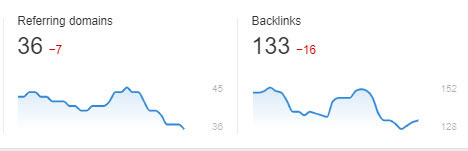
Figure 5 – backlinks over a 3-month period
The next step is to review the following:
- The domain or authority ranking – this is a number out of 100 which is awarded to the website by various SEO tools. The higher the number, the better authority it has.
- The number of referring domains and backlinks
- The number of do-follow and no-follow links
- The authority of the backlinks (eg; they’re from quality sites, not link farms)
- Which pages/posts are being linked to, and which have no backlinks
All this information helps us to assess the quality and extent of offsite SEO work that has been done, and to develop an offsite SEO recommendation plan.
Figure 5 below shows two graphs for a client’s site over a 3-month period. The graph on the left shows a recent decline in the number of referring domains and we can see a similar decline in backlinks. The declines correspond with when they stopped paying for the SEO consultant’s backlinking services.
Step 5 - Review Google statistics
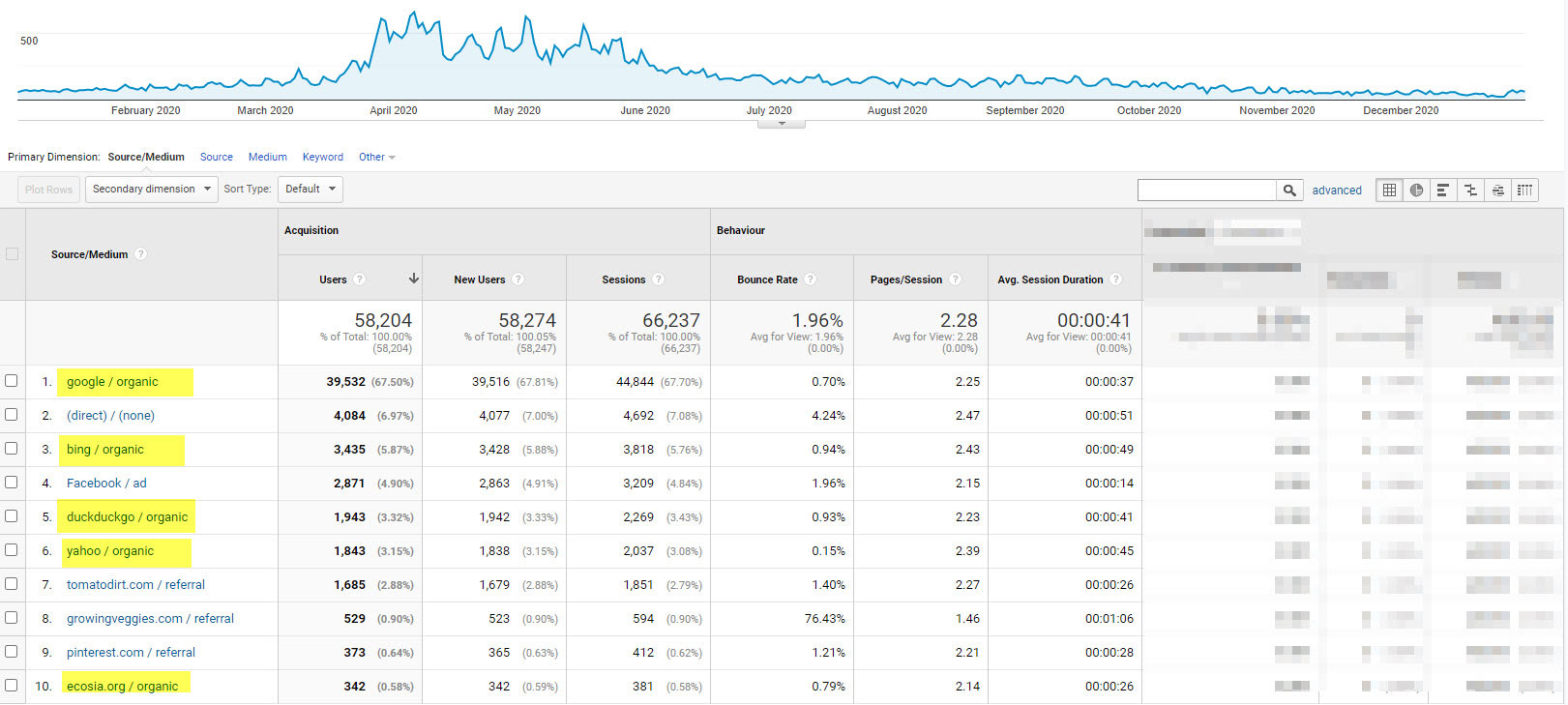
Figure 6 – traffic sources
Finally, the last part of our SEO review process is to take a look into Google statistics. Google provides a wealth of information about visitors to your website. The two main key Google tools to use are Google Analytics and Google Search Console.
Google Analytics statistics
The key reports to look at for SEO include:
- Acquisition > All Traffic > Source/Medium
Figure 6 below shows details of traffic sources for one of our gardening sites – the entries in yellow show organic traffic from various search engines, indicating that the SEO efforts have helped drive traffic, particularly from the US sector during their springtime.
- Audience > Benchmarking > Channels
The Google benchmarking reports show you how well you're competing across traffic channels in your industry.Figure 7 below is a benchmarking report showing traffic sources. We set the parameters to compare our site against other gardening sites across the globe, and it shows that we are doing very well with attracting new visitors through organic search and referrals (backlinks), but not so well when it comes to keeping people on the site, so we have a bit of updating to do to improve the site content.
Google Search Console statistics
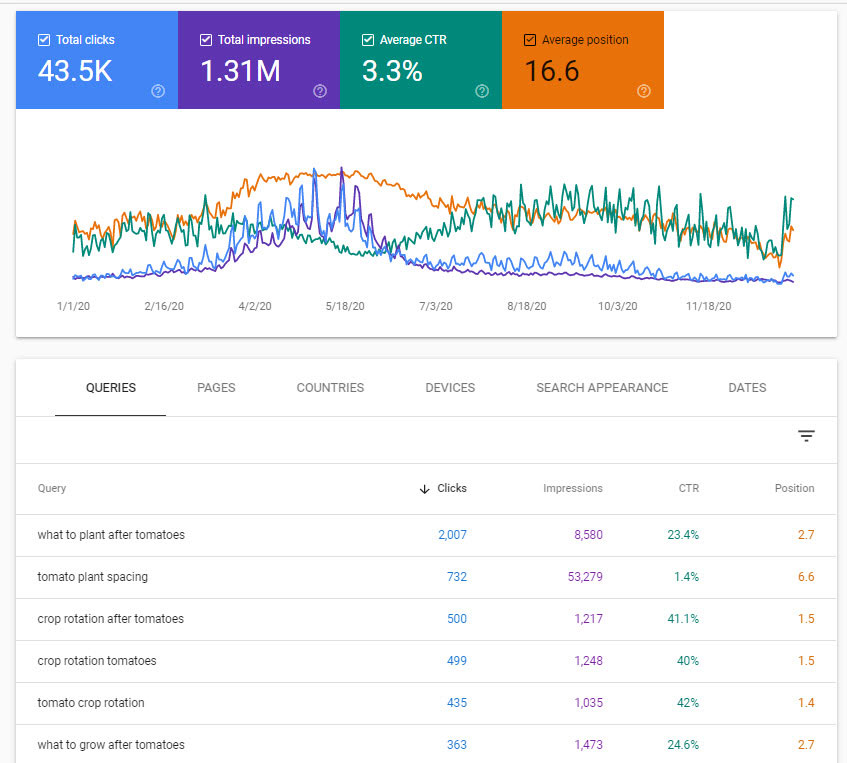
Figure 8 – keyword searches and click through rates.
Google search console is another great tool for analysing SEO indicators. We also link our clients’ Google Search console account into their Google Analytics account to obtain a range of interesting stats.
- search-console>performance>search-analytics
Figure 8 below shows what keywords people used to see our site in search results. We can see that we are showing up on page one of Google searches for a number of keywords and some terms are getting very good click-through rates. Those with lower click-through rates indicate that we need to improve the SEO title and meta-descriptions to entice more click-through. These stats also show that our keyword positions in search engines are starting to decline, (orange line) so we need to do some more SEO work
We also use Google Search Console reports to analyse other important SEO KPIs such as:
- core web vitals
- mobile usability
- index coverage
- structured data
- top linked pages
- top linking sites
What to Look for in a Good SEO Partner
Every business owner deserves to know exactly what's happening with their online visibility — and to work with someone who explains it clearly, without the jargon.
We've worked with many local businesses who came to us after feeling let down by previous SEO experiences. Not always through bad intentions — often it simply came down to outdated approaches, a lack of local knowledge, or reporting that focused on the wrong things.
Here's what genuinely effective local SEO looks like:
1. The right keywords for the right audience. Good local SEO isn't about ranking for as many keywords as possible — it's about showing up for the searches your ideal local customers are actually making. That means research into what people in your area are searching for, and building your visibility around those specific terms.
2. Transparent reporting that ties back to real results. You should always be able to see a clear connection between your SEO activity and actual outcomes — more calls, more enquiries, more foot traffic. If your reports are full of graphs but light on explanation, that's worth questioning.
3. A strategy built for 2026 and beyond. Local search now spans Google's organic results, the local 3-Pack, Google Business Profile, and AI-generated answers in tools like ChatGPT and Gemini. A good SEO partner is making sure your business shows up across all of these — not just ticking the traditional boxes.
The businesses winning local search today aren't necessarily the biggest or the best-known. They're the ones with a partner who understands how local visibility really works — and keeps ahead of how it's changing.
Get an independent SEO audit of your site
If you’re not sure whether your SEO is being done properly, and you’d like an independent assessment, we can help.
We will perform an SEO audit with total transparency, so that you get the whole unvarnished truth.
- We’ll conduct an indepth assessment following the five steps outlined above, and walk you through the results.
- We’ll show you through the back of your website, and advise what SEO work has been done well, and what may still need work, and explain why.
- We'll also show you through your Google Analytics account and help you analyse the results.
- We’ll provide recommendations and priorities, so you have a plan to work to.
We charge a small fee to cover the cost of the tools and the time it takes us to conduct the SEO audit and deliver the results and recommendations.
Investing in an independent audit will arm you with the facts and the knowledge you need to make decisions, and could potentially stop you wasting any more money on ineffective SEO services.
Get your onsite SEO audit by clicking the button above, and we'll send you an email outlining the information we need from you to get the audit underway.
